

 Refresh
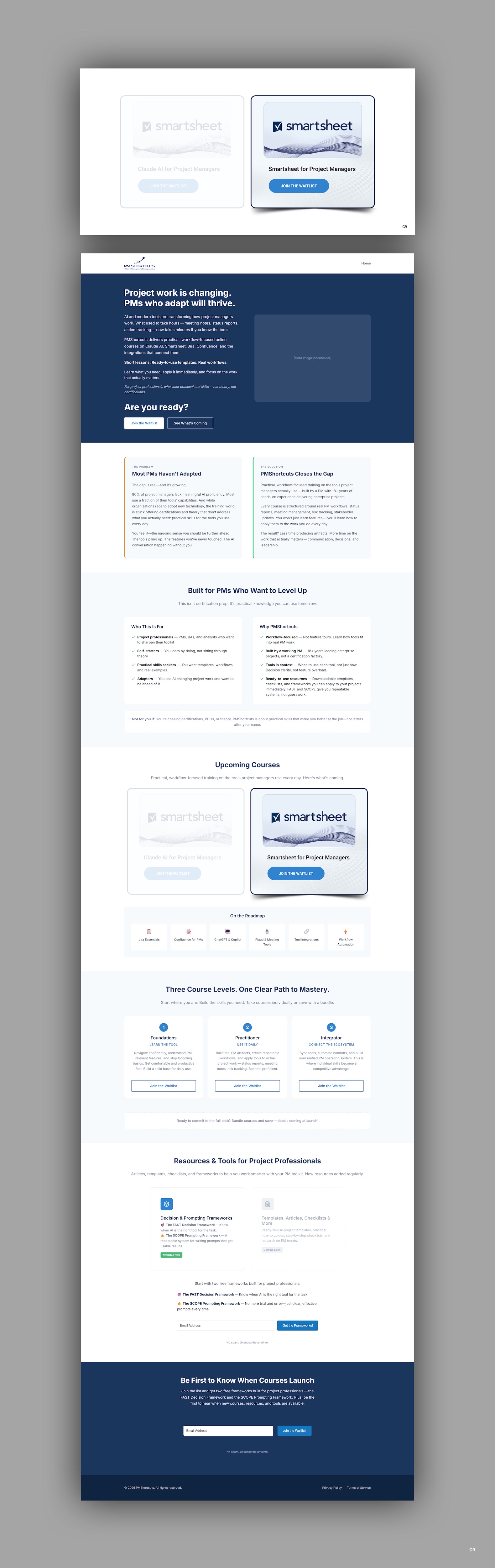
Online training business needs graphic for Smartsheet course carousel
Want to win a job like this?
This customer received 26 graphic designs from 6 designers. They chose this graphic design from pb as the winning design.
Join for free Find Design Jobs
- Guaranteed
-
 C$110
C$110
-
 26 designs
-
 6 designers
Graphic Design Brief
## Brand Foundation
Before reviewing individual briefs, designers should understand the PMShortcuts brand context.
### About PMShortcuts
PM Shortcuts provides online training courses that teach project managers how to master the tools they use every day — Claude AI, Smartsheet, Jira, Confluence, and more.
The name "PM Shortcuts" reflects our core promise: we help project professionals find the faster, smarter path to tool proficiency. Not cutting corners — finding the direct route to competence so they can focus on higher-value work.
**Target audience:** Junior to intermediate project managers who are self-starters. They're not looking for theory or certifications — they want practical skills they can apply Monday morning.
### Brand Personality
- Professional but approachable
- Modern and forward-thinking
- Efficient / streamlined
- Trustworthy and credible
- Confident without being arrogant
### Color Palette
| Role | Color | Hex | Usage |
|------|-------|-----|-------|
| **Primary** | Navy | #1a365d | Headers, primary text, key CTAs |
| **Accent** | Blue | #3182ce | Links, secondary buttons, accents |
| **Functional** | Green | #38a169 | Success states, positive indicators |
| **Functional** | Amber | #d69e2e | Warnings, attention, highlights |
| **Functional** | Red | #e53e3e | Errors, critical alerts |
| **Background** | Light Gray | #f7fafc | Section backgrounds |
| **Background** | White | #ffffff | Primary backgrounds, cards |
### Design Principles
- **Clean** — Minimal visual clutter, generous whitespace
- **Professional** — Business education aesthetic, not playful or casual
- **Trustworthy** — Modern SaaS look, established brand feel
- **Mobile-first** — All images must work at mobile sizes
- **Fast-loading** — Optimize for web performance
### Brands We Admire
**For atmosphere and restraint:**
- **Linear** (linear.app) — Subtle gradients and abstract motion that feel premium without trying too hard
- **Stripe** — Confident use of color, geometric depth, sophisticated without being cold
- **Anthropic** — Thoughtful, muted, intelligent. Never loud.
**For the "precision tool" feeling:**
- **Arc'teryx** — Technical product imagery that conveys capability through restraint
- **Porsche** — Engineering elegance. Nothing wasted.
**For forward momentum:**
- **McLaren** — Aerodynamic thinking applied to visual design
- **Rapha** — Movement and purpose, premium without flash
---
## Brief: Smartsheet Course Card Image
**Asset:** Course Card — Smartsheet for Project Managers
**Priority:** High — Second course planned, featured on homepage
---
### Context & Placement
Course cards appear in the "Upcoming Courses" section of the homepage, displayed in a horizontal carousel or grid. Each card represents a course focused on a specific tool.
**Card structure:**
- **Image** (this deliverable) — top portion of card
- **Course title:** "Smartsheet for Project Managers" — below image
- **Button:** "Join the Waitlist" — bottom of card
The image needs to immediately communicate "this is about Smartsheet" while feeling like part of the PMShortcuts brand system and visually cohesive with the Claude AI course card.
---
### Layout Behavior
Course cards use a **fixed aspect ratio** that remains consistent across all breakpoints. The cards themselves scale down on smaller screens, but the image proportions stay the same.
| Breakpoint | Card Width | Image Display Height | Behavior |
|------------|------------|---------------------|----------|
| Desktop | 320–400px | ~200–250px | Cards in row/carousel |
| Tablet | 280–320px | ~175–200px | 2-3 cards visible |
| Mobile | 260–300px | ~160–185px | 1-2 cards visible, swipeable |
**Aspect ratio:** 16:10 (1.6:1) — maintains consistency across the course card system
---
### Dimensions & Format
| Deliverable | Asset Dimensions | Display Context | Format |
|-------------|------------------|-----------------|--------|
| Primary | 800 × 500px | Scaled to card width | SVG (preferred) or WebP |
| Retina | 800 × 500px | 2x for crisp rendering | SVG scales naturally |
| Source file | Native resolution | — | Figma, AI, or PSD |
**Why SVG preferred:** Course cards benefit from crisp rendering at any scale, and SVG keeps file sizes minimal. If the design requires raster effects (gradients with noise, textures), WebP is acceptable.
**File size target:** Under 50KB
---
### Brand Integration Challenge
This card must serve two masters:
1. **Smartsheet brand recognition** — Visitors should instantly recognize this is about Smartsheet
2. **PMShortcuts brand cohesion** — It shouldn't look like we just copied Smartsheet's marketing materials
**The goal:** Honor Smartsheet's visual identity while making it clear this is *PMShortcuts' course about Smartsheet*, not Smartsheet's own training content.
---
### Smartsheet Brand Elements
**Required assets:**
| Element | Description | Usage |
|---------|-------------|-------|
| Smartsheet full logo lockup | Checkmark icon + "smartsheet" wordmark | Primary identifier — must use full lockup |
**Smartsheet's color palette:**
| Color | Hex | Usage |
|-------|-----|-------|
| Smartsheet Blue | #0073EA or similar | Primary brand color |
| Dark Blue | #003D73 | Secondary, depth |
| White | #FFFFFF | Logo mark, text on blue |
| Light Gray | #F4F4F4 | Backgrounds |
**Brand personality:** Smartsheet positions itself as powerful yet accessible — enterprise-grade work management that doesn't feel intimidating. Their visual identity is clean, confident, and productivity-focused. More "modern enterprise" than "startup playful."
**Reference:** https://www.smartsheet.com/newsroom (check for press kit or media assets)
---
### Visual Direction
**Primary concept: Smartsheet's identity, PMShortcuts' purpose**
The card should feel like a natural bridge — Smartsheet's enterprise confidence meeting PMShortcuts' practical focus. A PM seeing this card should think: "Oh, this is how I actually learn to use Smartsheet effectively."
**Logo requirements:**
- Use the **full Smartsheet logo lockup** (checkmark icon + "smartsheet" wordmark)
- This matches the approach used for the Claude AI card (logo + wordmark)
- Maintains consistency across the course card system
**Approaches to explore:**
1. **Logo-centric with environmental context**
- Full Smartsheet logo lockup as the anchor element
- Surrounded by subtle abstract elements suggesting structure, organization, or workflow
- Smartsheet blue background with PMShortcuts navy or blue accents at edges/borders
2. **Split or gradient blend**
- Smartsheet's blue palette transitioning into PMShortcuts' navy
- Full logo lockup positioned where the palettes meet
- Suggests "Smartsheet in the PMShortcuts ecosystem"
3. **Contained badge approach**
- Full Smartsheet logo lockup presented in a "badge" or "stamp" style
- PMShortcuts frame/border containing Smartsheet's visual identity
- Clear parent-child relationship: PMShortcuts course *about* Smartsheet
**Hierarchy guidance:**
- Smartsheet full logo lockup should be the dominant visual element
- PMShortcuts brand presence should be subtle — through framing, accents, or composition rather than competing logos
- Course title appears *below* the image in the card UI, so don't include text in the image itself
---
### What to Avoid
- ❌ Simply reproducing Smartsheet's marketing imagery — this needs to be original
- ❌ Adding partnership language or implying official affiliation
- ❌ Cluttering with multiple logos competing for attention
- ❌ Making the Smartsheet logo too small — it needs to be instantly recognizable
- ❌ Literal spreadsheet/grid imagery that feels generic or dated
- ❌ Screenshots of the Smartsheet interface
- ❌ Text within the image (title is handled by the card component)
---
### Relationship to Claude AI Card
This card must feel like part of the same family as the Claude AI card while respecting each tool's distinct brand identity.
**Consistency requirements:**
- Same dimensions and aspect ratio (16:10)
- Logo lockup placement in a consistent zone (match Claude card positioning)
- Similar level of visual complexity
- Similar compositional structure (if Claude uses centered logo with gradient background, Smartsheet should follow the same pattern)
- Cohesive when displayed side-by-side, despite different color palettes (warm coral/cream vs. cool blue)
**Contrast is okay:** The cards *should* have distinct color identities — that's how users differentiate courses at a glance. The structure and composition create unity; the palette creates distinction.
---
### Success Criteria
The course card image succeeds if:
1. A visitor instantly recognizes "this is about Smartsheet" within 1 second
2. It feels like a PMShortcuts product, not borrowed Smartsheet collateral
3. It maintains visual harmony when displayed alongside the Claude AI card (and future Jira/Confluence cards)
4. It works at small sizes (mobile cards ~260px wide)
5. It respects Smartsheet's brand without infringing or implying partnership
6. Must have cohesion with the PM Shortcuts logo in the website header (see https://pmshortcuts.com)
---
### Deliverables Checklist
| File | Dimensions | Format | Notes |
|------|------------|--------|-------|
| `course-card-smartsheet.svg` | 800 × 500px | SVG | Primary, scalable |
| `course-card-smartsheet.webp` | 800 × 500px | WebP | Fallback if SVG not suitable |
| `course-card-smartsheet.png` | 800 × 500px | PNG | Secondary fallback |
| Source file | Native | Figma/AI | Editable, layered |
---
### Reference Materials Needed
| Asset | Source | Notes |
|-------|--------|-------|
| Smartsheet full logo lockup | Extract from smartsheet.com or brand resources | Check if Smartsheet publishes a press kit; otherwise extract from website |
| PMShortcuts logo (SVG) | Will be provided | For brand cohesion reference |
| Claude AI course card | Previous deliverable (Brief #2) | For visual consistency reference |
**Smartsheet brand/press resources:** https://www.smartsheet.com/newsroom (check for press kit or media assets)
---